How the AI trip planner works
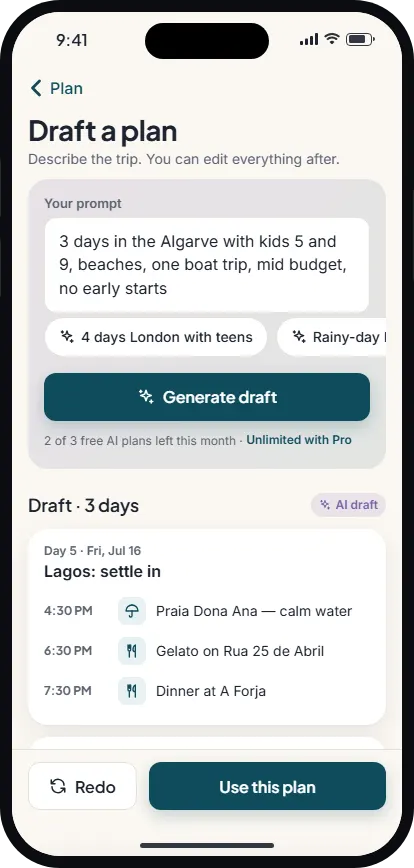
Open a trip, go to the Plan tab and choose Draft a plan. Wayfold sends your prompt with the trip’s destinations, dates and the travelers’ age groups to its own server, where the AI drafts the itinerary. It doesn’t send travelers’ names, your packing list or your documents.
The draft follows a few house rules, so it reads like a sensible first plan rather than a list of every sight in town:
- One entry per day of your trip, in order, using your dates – up to 30 days in one draft.
- Two to five activities a day, with start and end times that leave room for travel and meals. Arrival and departure days are lighter.
- Real, well-known places that a map search can find, with nearby places grouped on the same day.
- Plans that fit the group – no nightlife on a trip with young children, for example.
- A short practical note on activities where it helps: booking tips, what to wear, opening days.
It is a starting point, not a script. The AI can be wrong about a detail, so check opening times and book anything that needs a ticket before you go.
What to write in the prompt
The prompt is up to 500 characters of plain English. The more it says about how you like to travel, the closer the first draft gets. Good things to include:
- Who and how fast: “with teens”, “relaxed pace, no early starts”, “one big day, then a slow one”.
- What you love: museums, food and markets, beaches, hikes, a boat trip, nightlife.
- Budget: “mid budget”, “mostly free things”, “one splurge dinner”.
- Constraints: “rainy-day ideas”, “no car”, “back at the hotel by 9”.
Leave the prompt empty and Wayfold asks for a balanced plan for your destination. The example chips on the screen – such as “4 days London with teens, museums and food, mid budget” or “Beaches and one boat trip” – fill the prompt in one tap.
Your draft becomes your itinerary
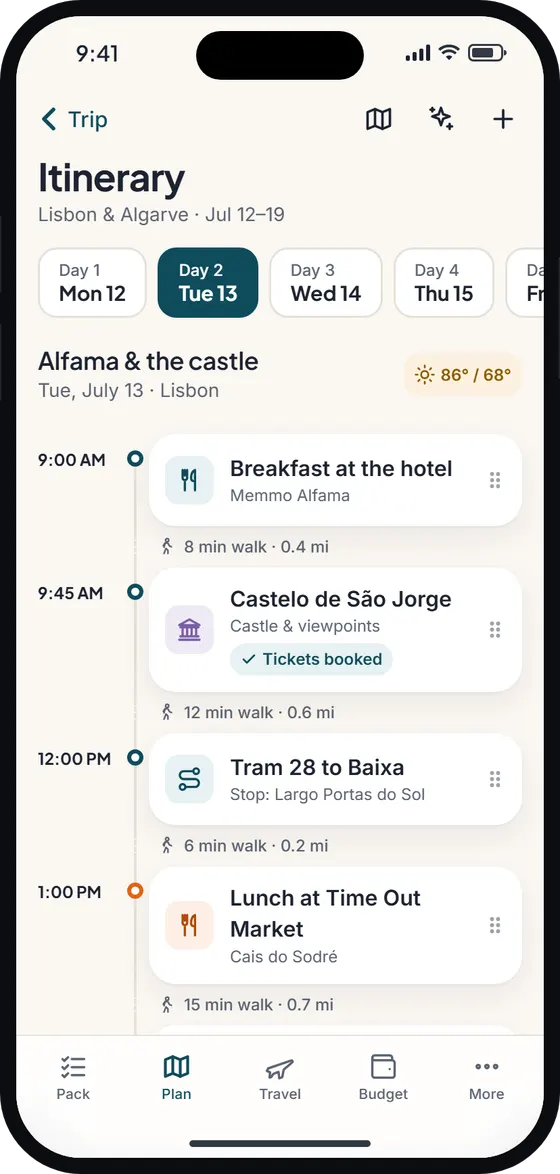
Tap Use this plan and the drafted activities land on the right days of your trip planner timeline. From there they are ordinary activities: drag to reorder, change a time, attach a different place, add notes or delete what you don’t fancy.
Already planned some days? Wayfold tells you how many days in the draft overlap and lets you choose: Add to my plan puts the drafted activities after what each day already has, and Replace days that are empty fills only the days you haven’t touched. Days you planned yourself are never overwritten.
The rest of Wayfold works on the drafted days too: the weather for each day, travel times between stops, the map, and the route planner, which can put a day’s stops in a quicker order. Want ideas the draft didn’t include? Browse things to do and drop them into a day.
From AI itinerary to packing list
Wayfold is built on one idea: plan the trip, and the suitcase plans itself. Each drafted activity comes back tagged – hiking, beach, boating, museums, fine dining and so on – with the same activity tags Wayfold’s packing rules use.
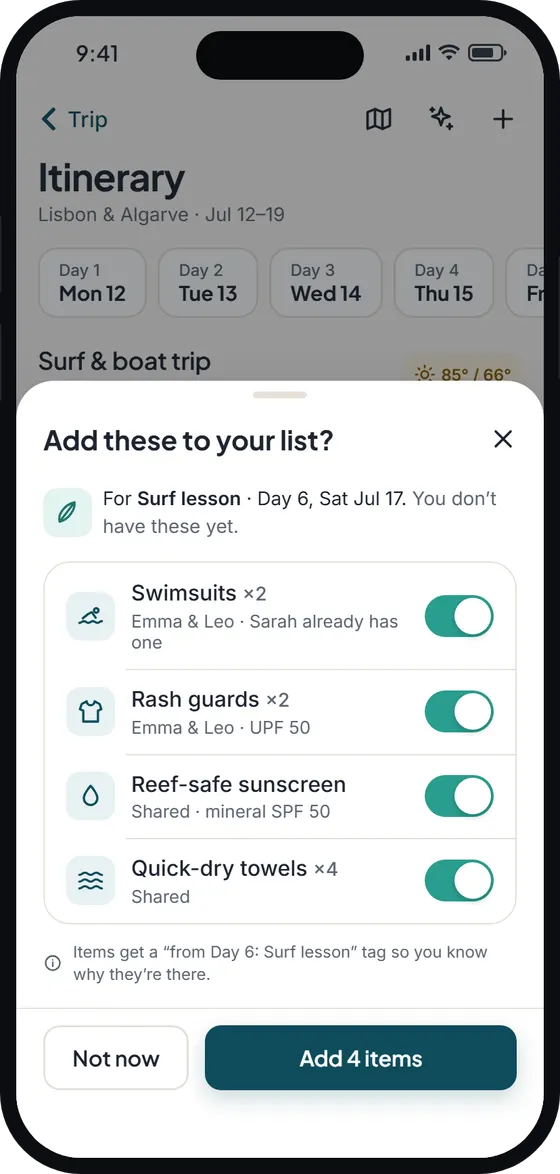
When you add an activity to a day, Wayfold offers the gear it needs on an “Add these to your list?” sheet – hiking boots and a daypack for a hike, a swimsuit and a towel for a surf lesson – and you choose what goes on your packing list. Nothing is added without your say-so.
Not ready for the app? Draft the days yourself with the free travel itinerary template, then build a list with the packing list generator or start from our packing list for vacation.
How Wayfold compares
| Capability | Wayfold | Typical packing app | Typical itinerary app |
|---|---|---|---|
| Day-by-day itinerary drafted from a prompt | Yes | Rarely | Sometimes |
| Draft uses your dates and travelers’ ages | Yes | Rarely | Varies |
| Choose to add to, or fill only empty, planned days | Yes | Rarely | Varies |
| Draft is editable on a timeline with a map | Yes | Rarely | Often |
| Activities tagged for packing suggestions | Yes | Usually not | Usually not |
Free AI itinerary drafts, and what Pro adds
- Free: 3 AI generations a month, shared across Wayfold’s AI features (itinerary drafts, AI packing lists, things-to-do suggestions and imports, AI food guides). The Draft a plan screen shows how many you have left, for example “2 of 3 free AI plans left this month”.
- Pro: unlimited AI drafts, plus the other Pro extras. Pro is $4.99/month or $29.99/year (£4.49 or £26.99 in the UK) with a 7-day free trial; see pricing.
- Sign-in: AI needs a free Wayfold account, so your plans sync. Planning by hand works without an account.
- Offline: drafting needs a connection. Once used, the plan is on your phone and works offline like any other.
Wayfold is coming soon to iPhone and Android.
Questions about the ai trip planner
Is the AI trip planner free?
Yes, within the Free plan’s 3 AI generations a month. Each draft, including a redo, uses one; a request that fails isn’t counted. Pro makes AI drafts unlimited. See pricing.
Will an AI travel planner overwrite the days I’ve already planned?
No. When a draft overlaps planned days, you choose between adding the drafted activities after your own, or filling only the empty days. Your own activities stay as they are.
How long a trip can the AI plan?
Up to 30 days in one draft. For a longer trip, draft it in parts by adjusting the dates or the prompt.
Can I edit the AI itinerary?
Yes, completely. Drafted activities become normal activities on your timeline: move, retime, rename or delete them, and add your own.
What does the AI trip planner send to the server?
Your prompt, the trip’s destinations and dates, and the travelers’ age groups. Not travelers’ names, your packing list or your documents. Read more in the privacy policy.